

I usually approach phone-tracking apps with some caution. They can be genuinely useful when a family member is travelling, when friends are trying to meet, or when I need to share my position without turning navigation into a complicated project. Phone Tracker – Location Share takes that focused route. It is a free Maps & Navigation app from MARO APPS, built around sharing a phone’s location rather than trying to become an all-purpose travel platform.
After spending time with it, my impression is that its appeal comes from simplicity. The app is aimed at people who want a straightforward way to communicate where they are, not users looking for a huge collection of route-planning tools, traffic layers, or social features. That narrow purpose is also its main trade-off: it can be easier to understand than a large navigation suite, but it is not the best replacement for one.
How Phone Tracker – Location Share feels in everyday use
The first thing I noticed is how quickly the app’s purpose becomes clear. The store summary describes it as simple, secure location sharing, while its short description calls it a phone tracker. Those phrases set a useful expectation: this is about communicating a location, not monitoring every aspect of someone’s day or replacing a dedicated map service.
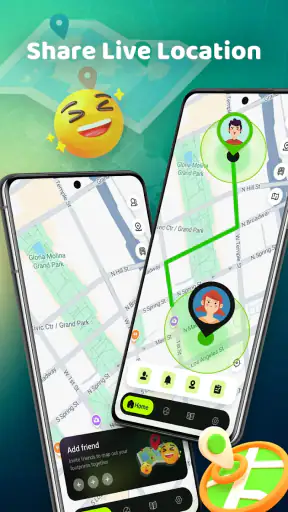
That distinction matters because location sharing is often needed at an inconvenient moment. Imagine leaving work late and asking a friend to meet you outside a busy station. You do not necessarily need a full route, a saved place, or a group-planning system. You need a way to show where you are so the other person can find you. In that situation, a compact location-sharing tool can feel more practical than opening a large app and searching through several menus.
I also see value in short-term situations. A parent might want to coordinate a pickup, a couple of friends might be trying to find one another at an outdoor event, or a traveller might share a current position while moving through an unfamiliar area. The useful habit is to treat the shared location as a communication aid, not as a substitute for telling someone your plans. A location pin can explain where you are, but a short message still helps clarify whether you are waiting, walking, or about to leave.
The strongest reason to try this app is its focused job: sharing a current location without demanding that you adopt a complete navigation ecosystem. That focus makes it approachable for people who find larger mapping apps cluttered. It also makes the app easier to judge. If you mainly need location sharing, it is relevant. If you expect live route guidance, detailed place discovery, or a sophisticated family dashboard, you may be looking in the wrong category of tool.
Speed expectations and the first moments after opening
For an app with this purpose, perceived speed is less about drawing an elaborate map and more about reducing the time between opening the app and reaching the sharing action. In my experience, that is the right standard to use here. A location-sharing app feels fast when it gets out of the way and lets me concentrate on the person I am trying to meet.
There is a practical difference between an app that opens quickly and one that provides a useful location quickly. The second depends on the phone’s location signal and surroundings, so a user should not judge the entire experience by the first instant on screen. Indoors, near tall buildings, or in crowded urban areas, positioning can take longer for reasons that are not specific to the app. I found it sensible to pause briefly and check that the displayed position makes sense before sending it.
That small check is one of my most important tips. When I am in a hurry, I am tempted to share immediately, but the first position a phone reports may not always be the most useful one. Waiting until the location settles can prevent a friend from walking toward the wrong entrance or meeting point. This is especially important around large stations, shopping centres, campuses, and parks where a few metres can make a surprisingly big difference.
The app’s current version is 1.0.40, which suggests that the experience is still best approached as a focused utility rather than a mature, feature-heavy platform. I would not install it expecting a long list of advanced controls. Its value is in doing a small task clearly. That can be a strength for occasional users, but people who enjoy fine-grained automation or extensive customisation may find the experience too limited.
What happens during heavier use
Location tools can become more demanding when they are used repeatedly during a day. A single share before meeting someone is a light task. Keeping a phone active while travelling, checking positions often, and switching between the tracker and other apps is a different kind of workload. I would therefore use Phone Tracker – Location Share in short, deliberate sessions rather than leaving it open without a clear reason.
This is not a criticism of the app alone. Location-related activity can place extra demand on a phone because the device has to determine its position, maintain connectivity, and keep the screen or app state available as needed. Older hardware, low battery, weak reception, or restrictive background behaviour can all affect the experience. If I were heading out for several hours, I would charge the phone first and avoid treating continuous tracking as a free, invisible process.
A useful workflow is to decide the purpose of the share before opening the app. If I am meeting someone, I can send the location once I am near the agreed area and then follow up with a landmark. If I am travelling, I can share at meaningful points rather than repeatedly sending updates every few minutes. This reduces unnecessary interaction and makes the information easier for the recipient to understand.
Another non-obvious trade-off is that a location share can create false confidence. A recipient may see a position and assume it is perfectly current, even if the sender has moved, lost reception, or stopped looking at the app. For that reason, I would pair important updates with plain language: “I am at the north entrance” is more useful than a pin alone. The app can provide the location, but the human explanation prevents misunderstandings.
Reliability depends on more than the app
Phone Tracker – Location Share has a solid public reception, with an average rating of 4.4 from around 5.8 thousand ratings and 272 written reviews. It has also passed the million-install mark, so it is not an obscure experiment with no audience. Those figures do not guarantee that every phone or situation will behave identically, but they do make the app easier to take seriously as an everyday utility.
In real use, reliability has several layers. The app must open, the phone must determine a position, the connection must carry the information, and the person receiving it must understand what they are seeing. A failure at any one of those points can look like an app problem. When a location seems wrong, I first check whether I am indoors, whether the phone has a usable connection, and whether the position has had time to settle.
Recovery is therefore important. If a share does not appear to work, I would not keep tapping the same action repeatedly. I would check the displayed position, move to a clearer area if possible, and try again once. If the situation is urgent, I would send a normal text with a landmark or address as a backup. That is not a sign that the app is useless; it is simply sensible planning for any location-dependent tool.
I also recommend agreeing in advance on what the recipient should do with the information. A shared position is most helpful when both people know whether it means “I am here now,” “come to this meeting point,” or “follow my progress.” Without that context, even an accurate location can lead to unnecessary calls and repeated messages.
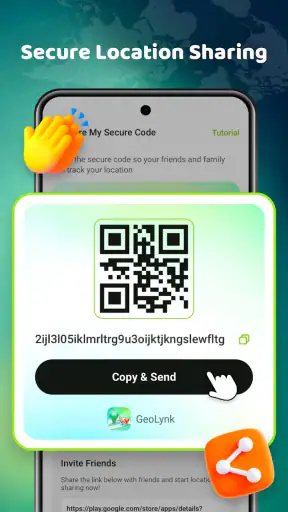
Security deserves a practical, everyday interpretation. The store summary presents the app as secure location sharing, but I still would not share my position casually or with a large audience. I would choose recipients carefully, avoid sending a location when there is no clear reason, and stop communicating it when the meeting or journey is over. The safest location-sharing habit is limited sharing with a clear purpose.
Device constraints and the people who should think twice
The app supports devices running Android 7.0 or later, which gives it a broad reach across Android phones. That does not mean every supported device will deliver the same experience. A newer phone may handle switching between apps more smoothly, while an older model may be more affected by battery-saving behaviour, limited memory, or an inconsistent location signal.
Before relying on it for an important trip, I would test it at home with the person who is expected to receive the location. That simple rehearsal answers the questions that matter most: can I open the app comfortably, does the position appear where I expect, and does the other person know what to do with it? Testing beforehand is more useful than discovering a problem outside a station or in an unfamiliar neighbourhood.
People who use older phones should also keep expectations realistic. The minimum operating-system requirement is Android 7.0, but operating-system compatibility is only the starting point. A phone with aggressive power management may interrupt location activity more readily than another device. If the app is being used for a short share, that may not matter. If someone expects uninterrupted updates over a long period, device behaviour becomes much more important.
Battery awareness is another practical consideration. I would avoid opening the app repeatedly just to reassure myself that a location has not changed. If the other person needs an update, send one with a clear message. This approach is easier on the phone and produces less ambiguous communication than silently expecting a location pin to answer every question.
How it compares with familiar alternatives
The usual alternatives fall into two broad groups. The first is a full mapping app, which is better when I need turn-by-turn directions, traffic information, business searches, saved places, or a route shared with a destination. The second is a broader family-safety or social-location service, which may offer ongoing circles, alerts, history, and more persistent coordination.
Phone Tracker – Location Share makes more sense when those larger systems feel excessive. If I only want to tell a friend where I am, a focused app can reduce visual clutter and avoid making a simple meeting unnecessarily complicated. It may also suit someone who does not want to build a large location-sharing network and prefers to use the tool only when a specific situation calls for it.
The trade-off is depth. A full navigation app is the better choice when the recipient needs to know how to reach me, not merely where I am. A family-oriented service may be better for households that have agreed to ongoing location visibility and need recurring alerts or broader coordination. I would not choose this app as my only travel tool, and I would not recommend it to someone who expects a complete safety-monitoring system.
There is also a privacy trade-off between occasional sharing and permanent sharing. A focused tool encourages me to share for a particular reason, while a persistent service can be more convenient for established routines but may expose more information over time. Neither approach is automatically right for everyone. My preference is occasional, intentional sharing unless a family has a strong reason to use something more continuous.
Who will get the most from it
I think the app is a good fit for people who often need to answer “where are you?” with something more useful than a vague description. It can help friends meeting in busy places, families coordinating pickups, travellers checking in during a journey, and anyone who wants a dedicated location-sharing shortcut instead of navigating a large map application.
It is also suitable for users who value a free app with an Everyone content rating and a narrow learning curve. The developer, MARO APPS, has kept the product’s identity centred on location sharing rather than presenting it as a general-purpose digital companion. That makes the decision simple: install it if that task is common in your life, and skip it if you need a much wider navigation toolkit.
I would be more hesitant to recommend it to someone who needs professional-grade route planning, detailed offline navigation, long-term location history, or a carefully managed family system. It is not the right answer merely because it involves maps. The important question is whether the basic act of sharing a phone’s location is the main thing you need.
My performance verdict after weighing the trade-offs
Phone Tracker – Location Share succeeds when I use it as a small, purposeful utility. Its perceived speed comes from its focused role, while its reliability is strongest when I give the phone time to settle on a position and keep a backup message ready for important situations. I would not measure it by the standards of a full navigation suite because it is solving a narrower problem.
The app’s 4.4 average and audience of over a million installs make it a credible option to try, and the free price removes the main barrier to testing it for yourself. The Android 7.0 minimum also keeps it accessible to many existing devices. Still, I would install it with sensible expectations: location accuracy and responsiveness can vary with the phone, surroundings, connection, and battery conditions.
My recommendation is straightforward. If you want a simple way to share where you are, this app is worth considering, especially for occasional meetups and everyday coordination. If you need directions, persistent family monitoring, or advanced travel features, choose a more specialised alternative instead. For me, its best quality is not that it tries to do everything, but that it gives a clear purpose to a task that often becomes unnecessarily complicated.


